Agentforce Revenue Cloud : Product Catalog Management
Product Catalog Management is a core component of Salesforce Revenue Cloud, serving as the single source of truth for product information. It enables organizations to define products, attributes, and rules that control product behavior and visibility across the quote-to-cash lifecycle.
"MD" - Maruthi Dronamraju
1. Introduction
Product Catalog Management (PCM) in Salesforce Revenue Cloud is the foundational component that acts as the single source of truth for all product-related information. It enables organizations to model, configure, and govern products, attributes, and associations in a centralized, reusable way. By separating product structure from pricing and transactions, PCM ensures consistent, accurate product data across CPQ, Orders, Billing, and Revenue Recognition, while providing the flexibility to manage multiple catalogs, categories, and complex product hierarchies for different markets or customer segments. Product Catalog Management App can be accessed from App Launcher (grid icon)
2. PCM Components
Product Catalog Management (PCM) is made up of several key components, including Product Catalogs, Product Categories, Product Classifications, Dynamic Attributes, and Products. Together, these components allow organizations to model, organize, and govern their offerings effectively, providing a flexible and centralized structure for configuring, managing, and selling products across the entire quote-to-cash lifecycle.
2.1 Product Catalogs
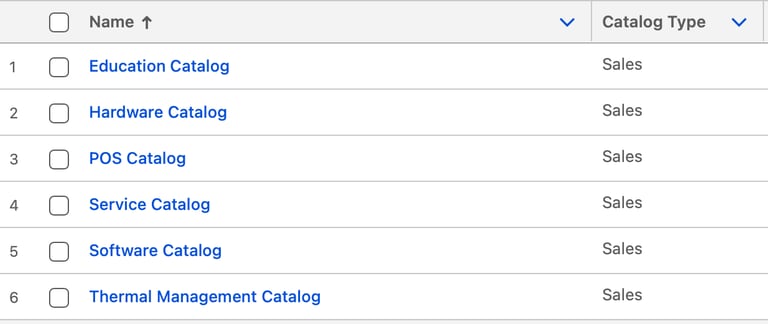
A Product Catalog is a curated collection of the products your company offers, organized to make discovery and navigation easy. Within a catalog, products are further structured into categories and subcategories, providing a logical hierarchy that helps users quickly find and select the right products for quotes, orders, and transactions.
2.2 Product Categories
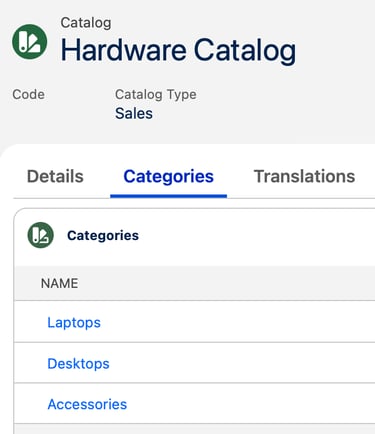
Product Categories provide a logical, hierarchical classification of products within a catalog to improve discoverability, navigation, and user experience. Categories do not change product behavior or pricing; instead, they organize products in a way that aligns with how the business thinks about its offerings. Categories can be nested to support multi-level structures and reused across catalogs.
2.4 Product Classifications
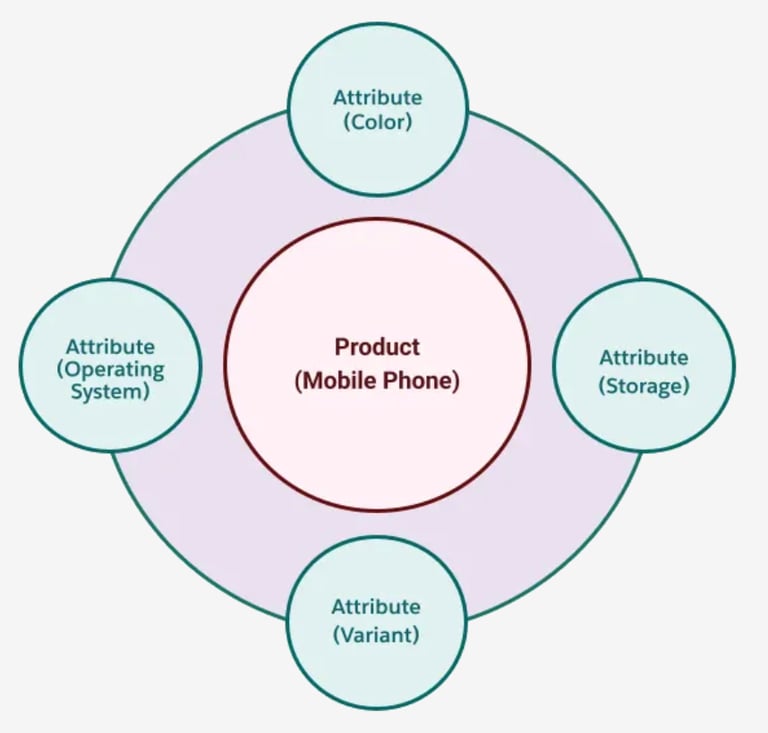
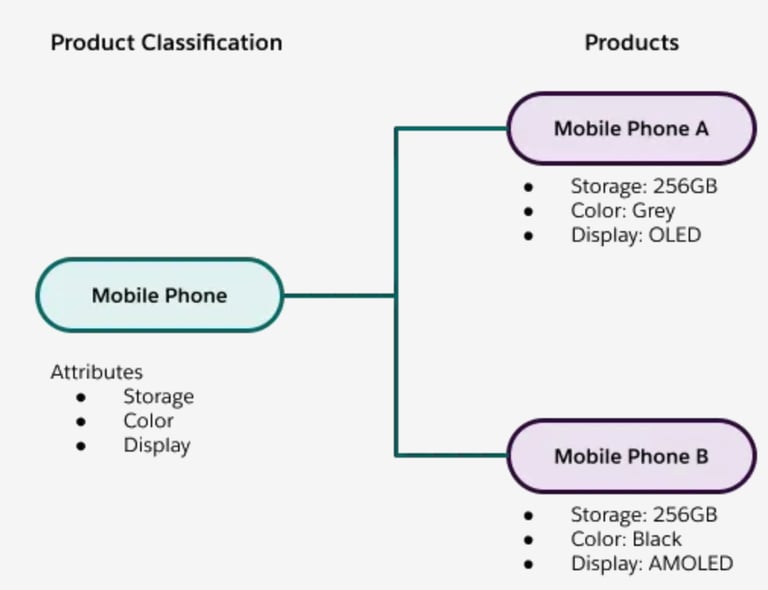
Product classifications are templates that hold a collection of dynamic attributes that you can use to create multiple products which are similar yet different. These products inherit the attributes of the classification and you can override these attributes, if necessary. In short, you can create new products faster using product classifications.
For example, consider Mobile Phone as a Product Classification that defines common attributes such as OS, Storage, Color &Variant. Using this classification, you can create multiple products like iPhone, Google Pixel, and other mobile phone variations without having to define each product from scratch. Each product automatically inherits the attributes and configuration rules from the Mobile Phone classification, ensuring consistency and saving time when managing a large catalog of similar products.
2.5 Products
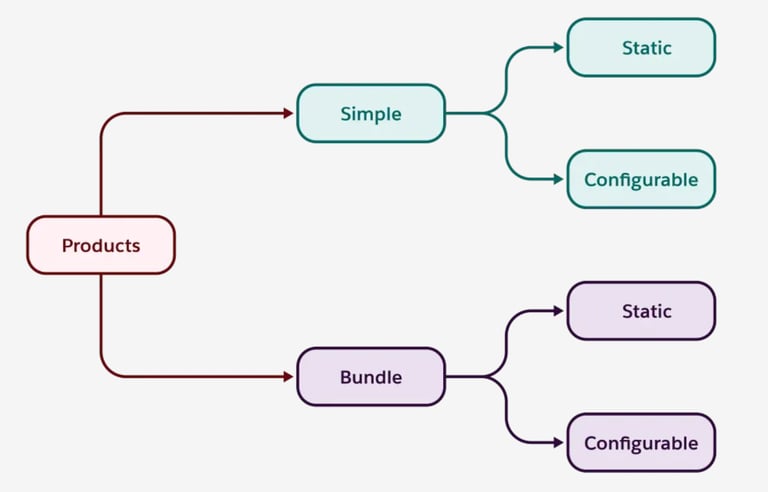
Products are the items or services your company sells to customers, and they can be defined as Simple or Bundled. Simple products are standalone items without a hierarchy, while Bundled products consist of multiple products sold together as a single unit, such as a laptop bundle that includes a laptop, mouse, and monitor. Products can also be Static, sold as-is without customization, or Configurable, allowing adjustments during selection—for example, making the mouse optional in the laptop bundle or specifying the number of USB ports when adding the bundle to a quote.
2.3 Dynamic Attributes
Dynamic Attributes in Salesforce Revenue Cloud PCM allow products to capture configurable information that can change based on context, rules, or selections during product configuration. They enable products to adapt dynamically, supporting complex offerings without hardcoding values, and help ensure accurate, consistent configuration across the quote-to-cash lifecycle.
To organize attributes efficiently, Attribute Categories are used. These categories group related attributes together, making it easier to manage large sets of attributes and improving the user experience during product configuration. By structuring attributes into logical categories, businesses can guide users through configuration more effectively and reduce errors.
Attribute Picklists provide predefined sets of selectable values for an attribute, ensuring consistency and accuracy while simplifying configuration choices for users. Picklists help enforce business rules and standardize input, making the configuration process faster and more reliable, especially when dealing with complex or customizable products.
2.6 Product Configuration Flow
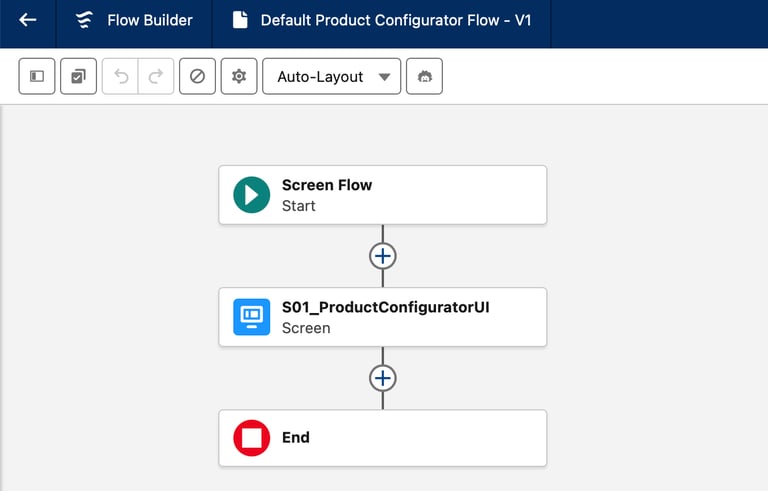
The Product Configuration Flow in Salesforce Revenue Cloud guides users through selecting and configuring products in a structured, rule-driven manner. During configuration, users select products from a catalog, enter values for dynamic attributes, and choose applicable options or bundled components, while constraints and compatibility rules are evaluated in real time to ensure valid selections. A Product Configuration Flow can be assigned at either the Product level or the Product Classification level, allowing reuse and consistency across similar products; if none is explicitly assigned, the system uses the standard Default Product Configuration Flow before proceeding to pricing, quoting, and downstream quote-to-cash processes.
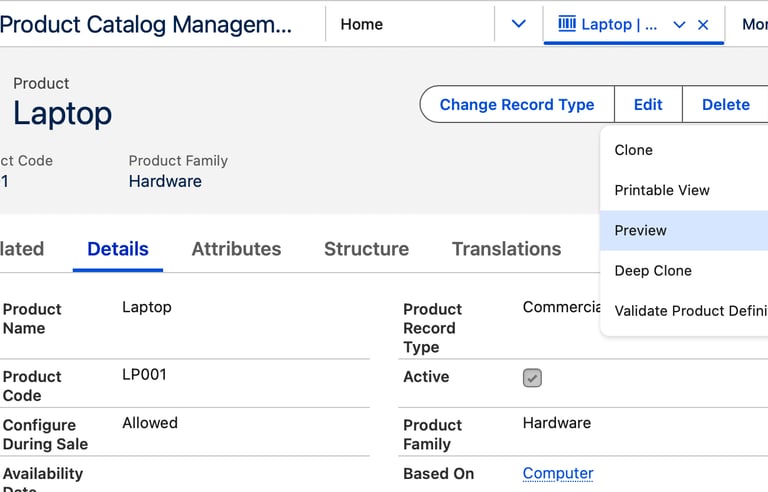
You can use the Preview button on the Product page to view and test the currently assigned Product Configuration Flow for that product. The Preview option launches the configuration experience exactly as it would appear during quoting, allowing you to validate dynamic attributes, options, and constraint behavior before the product is used in live transactions.
2.7 Product Qualification & Disqualification Rules
Qualification Rules in Salesforce Revenue Cloud determine whether a product is eligible to be displayed or selected based on specific conditions. These rules evaluate criteria such as customer attributes, region, account type, or previously selected products, ensuring that only relevant and applicable products are presented during the configuration and selection process. By applying qualification rules, organizations can simplify the user experience and guide sellers toward appropriate offerings.

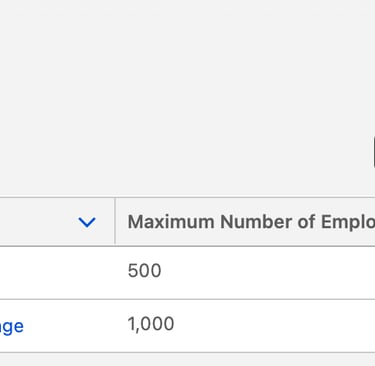
Disqualification Rules define the conditions under which a product or option must be excluded from selection. These rules prevent invalid or non-compliant configurations by removing products that conflict with selected options, violate business policies, or fail eligibility criteria. Disqualification rules help enforce constraints proactively, reducing errors and ensuring that only valid product combinations move forward in the quote-to-cash lifecycle.

2.8 Product Selling Models
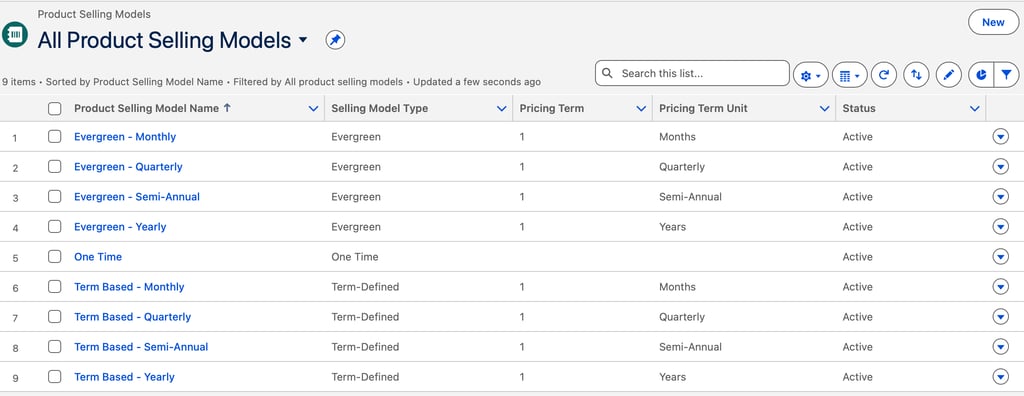
Product Selling Models in Salesforce Revenue Cloud define how a product is offered and transacted with customers, such as one-time purchase, subscription-based, usage-based, or hybrid models. These models influence how products behave across quoting, ordering, billing, and revenue recognition, including aspects like term length, renewal behavior, and consumption tracking. By separating selling models from product structure, Revenue Cloud allows organizations to support multiple monetization strategies for the same product without duplicating catalog definitions.
2.9 Index & Search Configuration
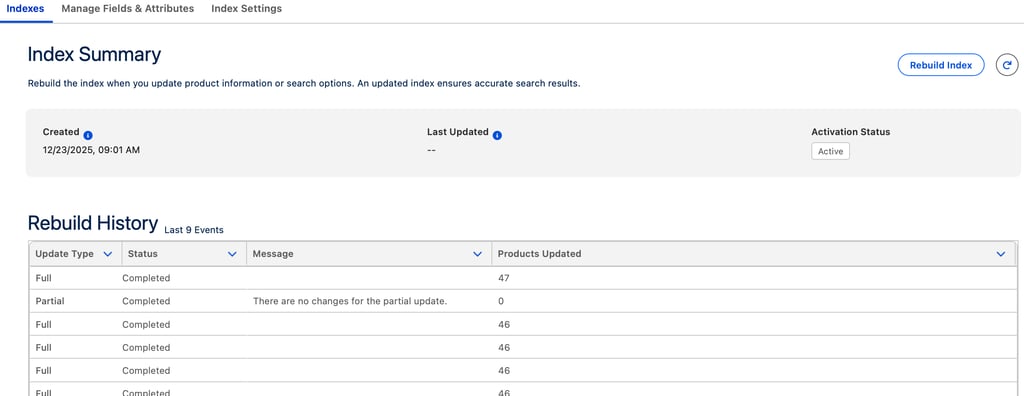
Index and Search Configuration in Salesforce Revenue Cloud optimizes how products are discovered during selection and configuration. By indexing key product fields, attributes, and categories, Revenue Cloud enables fast, relevant search results even in large, complex catalogs. Proper search configuration improves user efficiency by allowing sellers to quickly locate eligible products based on keywords, filters, and attribute values, while respecting catalog visibility rules and qualification constraints.
In conclusion, Product Catalog Management is the cornerstone of Salesforce Revenue Cloud, providing a governed, scalable, and flexible foundation for modeling what a business sells. By centralizing product definitions, attributes, configuration flows, constraints, and selling models, PCM ensures consistency and accuracy across the entire quote-to-cash lifecycle. A well-designed PCM not only simplifies product management but also enables organizations to adapt quickly to new offerings and monetization strategies with confidence.
3. Conclusion
2.11 Product Catalog Management Permission Sets
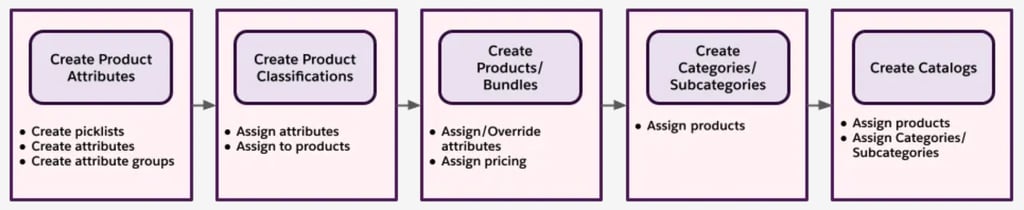
This flow is a bottom-up approach that starts with creating smaller product elements before moving on to the creation of actual products and bundles. The last stages involve defining the product categories and if needed, separate catalogs.
Using this method, you start by creating product features, like size, color, and data capacity. Then, you create product classifications, to which you assign individual products and bundles. Next, create the products themselves, and assign them to categories and subcategories for a logical structure. If you have many products and a broad range of product types, you can assign them to different catalogs.
You can complete the stages in a different order, depending on your workflow. For example, you can skip creating categories and subcategories.
2.10 Product Catalog Design Journey
Support
info@cpqgurus.com
(408) 475-4180
© 2025. All rights reserved. CPQ GURUS is a specialized division of Clerisoft, Inc., dedicated to Salesforce Revenue Cloud consulting and innovation.